
My Air Traffic Conflict

Image by Wälz from Pixabay

A friend of mind is encouraging me to write about air traffic control on my blog. She is someone whom I respect greatly, a retiree from the industry and someone who has the consulting job of my dreams. I have mixed feelings with regard to talking about air traffic in a public forum. On the one hand it is what I have been doing with my life for nearly 30 years and I do know a lot about it. On the other hand there is a lot that is political, controversial or just plain up for interpretation, which could invite some backlash. On one side I have a lot of bitterness from what I perceive as poor overall management. On the other hand this is by far the best job I’ve ever had on almost any practical scale I care to measure. 

So my mentor says I should write about ATC (air traffic control) because she thinks it can add credibility to any application I might make for a consulting job after I retire. She should know. She works as an independent consultant who works from anywhere she wants and works whatever hours she wants. Her hourly rate is outrageous and if they do need her in person somewhere, they fly her wherever she needs to go and compensate her very well. Yes, I want to be her. The cynical side of me worries that my honest opinions could get me blackballed from the very companies I would like to work for.

For starters, who am I to talk with any authority on the subject? I don’t have a college degree, though I have been told that my experience is the equivalent of having a Ph.D. in the field. I don’t really agree with that educational assessment though I respect the source. I suppose it makes sense when you consider that Ph.D. stands for Doctor of Philosophy, because I feel like once you get to a certain level in an area of knowledge you become a philosopher. I mean a philosopher in the sense that you start to question and evaluate the very basic principles that are the core of your profession. 

In terms of practical experience, I have worked at four different facilities, and air traffic is very facility specific. A person can be a working controller for decades and still need to train for months or years to be certified at a new facility. I have been in management, I have helped develop procedures, and been heavily involved in QA/QC(Quality Assurance and Quality Control), mostly the QC side. I have taught classes and trained around thirty other controllers. None of this experience is really unique or particularly ambitious for someone who has been doing this as long as I have.

I am honestly not sure who my audience should be when writing on the subject. Should I try to write for the layperson who has little to no understanding of the industry and thinks I wave batons to assist parking aircraft? Should I write to pilots who have a basic understanding of aviation but do not know all the intricacies and expectations of the mysterious controller on the other end of the radio? Perhaps I should write to the perspective or developmental air traffic controller who has little to no concept of the world they are stepping into.

This niche could definitely help  improve my writing. It is something I can say a lot about at least somewhat competently. I would never be at a loss for words or subject matter. The research materials are at my fingertips, though I would likely just use ChatGPT for that sort of busy work anyhow. 

I will play it by ear for now and perhaps write a few posts that address the most commonly asked questions we get from pilots or laypersons. For now I shall close with a disclaimer provided by my favorite AI assistant: The views and opinions expressed in this blog are my own and do not represent the official policies, positions, or opinions of the Federal Aviation Administration (FAA) or any other governmental agency. I do not speak on behalf of the FAA, and any information provided is based on my personal experience and knowledge.

Blender and Unreal Engine

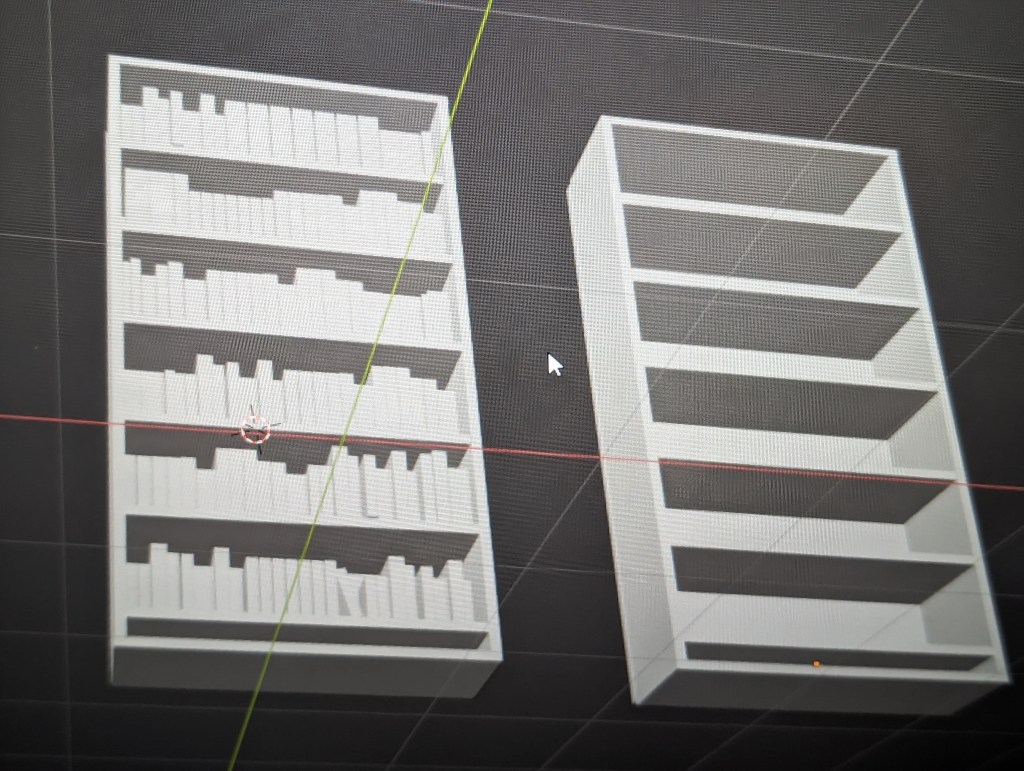
Bookcases made in Blender by me


     A friend of mine was showing me some cool stuff he was doing with Blender and Unreal Engine and it got me motivated  to get into the Blender class I bought on Udemy a while back. I made a bookcase and showed it to some friends. Someone mentioned that I could probably make a bookcase more easily using Unreal Engine. Then I thought to myself, hey, I have made a bookcase on Unreal Engine before and the comment got me wondering if it was really true that Unreal was easier than Blender, at least with respect to bookcases..

     So why am I making bookcases? This is mainly because I am a nerd who loves to collect books. I should say that I used to collect books but unfortunately, I have found it financially prudent to sell them off a couple times in my life. The first time was when Ebay first came out and I was fascinated with the auction process. I sold a bunch of books and all my old Transformer toys from the 80s. Then I bought a car, not a great car but a functional one. Why? Because I really wanted a car, and I was 22 and didn’t have one yet. The books and toys had just been sitting around at my parents house for years anyway. The second time I sold all my books involved downsizing after a career change and in preparation for a move. I was able to replace most of my old yard sale furniture with new stuff. The third time was just after moving into a new house. I had a lot of books at this point, the moving team was quite surprised at the extra workout. The new house needed about 60k in renovations, so I sold all my books except for a few special ones that were signed specifically for me by the authors. Did the books pay for all the renovations? Well no, but they covered most of it.

      So I really love books, however, it became apparent after having a kid and lots of expected and unexpected house guests over the years that rebuilding the book collection in this particular home would not be practical. For this reason one of the early projects I’d like to work on in Unreal Engine is creating a virtual man-cave where I can have all the cool gee-whiz stuff that I can’t afford and don’t have space for in real life. This shall of course include a virtual library.

     The bookcases I have built so far in Blender and Unreal Engine are not anything exciting or fancy. I am at the beginning stages of both and I am basically just joining rectangles together. I had an easier time in Unreal because I did not fill the bookcase with books and it is very easy to drag and drop a wood material onto the bookcase to color it. I still haven’t figured out how to color stuff on Blender, mostly because my class hasn’t gone there yet. However, I didn’t see an easy drag and drop option like UE.

     During the process I learned that materials on Unreal Engine do not always drop on at the right size for some reason. With a little research I found out that I could open the material blueprint and add a texture coordinate node and attach it to the uv part of the material texture sample. Then you can adjust the  u tiling and v tiling to change the relative size of the texture. This technique may be handy for another project I’m thinking about.

     The Blender bookcase was a result of me practicing some of the stuff I had learned in the Udemy class. There was a demo where the instructor used a lot of basic shapes combined with scaling and rotation to create a little scene including a house, some trees and even some blocky cars. I followed along for a little while, but I really wanted to try a bookcase and some books. The bookcase was a simple affair of five rectangles for the main structure and a bunch of duplicated rectangles for the shelves. The books were four rectangles which included the spine, front and back cover and the pages joined together. I used scaling along the various axes to make books of different sizes, joined them and filled the shelves. This took a lot longer than expected as getting the books to all line up correctly and then aligning them on the shelves was tougher than I thought. There is probably an easier way to do it, but I didn’t know how to move the camera so I actually moved the bookshelf around a lot so I could see what I was doing. I also couldn’t figure out how to get the books to just snap to the shelves. What I did get, was a lot of practice with the hotkeys for grabbing and moving along the x,y, and z axis and switching the isometric views with the number pad. I am looking forward to making more bookcases with higher level skills.

My goal is to really leverage what I understand about this software in the next few months. It seems like Blender and UE really are like the peanut butter and jelly of game design. Blender is the cool free software that lets you sculpt, model and animate whatever you want. Then you can take these toys to Unreal Engine’s playground and create game rules and interactions around them.

Why Unreal Engine

Image by Craig Adderley

So why am I trying to learn Unreal Engine? With so many great game engines out there, why this one in particular? Well, the big reason of course is that I can download it and play with it completely for free, which suits my rather slim budget quite well. Another reason is that I have some old friends in similar situations as myself who are also learning UE, which means I’m not alone. The game engine also has an impressive array of capabilities that will allow me to do just about anything I’ve ever imagined.

Nothing beats free software with a huge range of support behind it. I don’t have the time or extra cash to go to a school where I have access to expensive software. Plus, I may spend a year learning it and then decide I want to try something else. Free means there is no pressure to make an income out of this if I don’t want to. For now it’s still fun and engaging, but I’m still a newb. This is a similar line of thinking that directed my interest toward learning Blender and not Maya. 

 Unreal Engine is software developed by Epic Games, offering a myriad of capabilities including robust graphics and advanced rendering features, including high-quality visual effects, realistic lighting, and detailed textures. This enables developers to create beautiful, lifelike environments and characters. UE is a preferred choice for creating AAA titles and cutting-edge virtual reality applications. It’s relatively user-friendly and offers a wide range of built-in tools for various aspects of game development, such as level design, animation, physics simulation, and visual scripting through Blueprint. These intuitive tools streamline the development process, empowering both seasoned professionals and newcomers to bring their creative visions to life.

Unreal Engine also supports multiple platforms, including PC, consoles, mobile devices, and VR headsets. This cross-platform compatibility allows developers to create games for diverse audiences without needing a lot of extra software or resources.

Another benefit of Unreal Engine is the community support and extensive documentation. The engine boasts a large and active community of developers, fostering collaboration, sharing of knowledge, and access to numerous resources, tutorials, and forums. This support network is invaluable for developers seeking assistance, troubleshooting, or guidance during their game development journey.

Now we are back to UE’s attractive pricing model. While it used to have a royalty-based system for revenue generated from games, Epic Games now has a more friendly approach, offering royalty-free access to the engine’s full suite of tools, making it even more accessible to developers of all sizes. Of course if you make an awesome game and get a ton of money you need to pay your dues, which is fine. If I somehow manage to publish something with this engine that makes more than a million dollars, Epic is welcome to their cut.

In summary, Unreal Engine’s graphical capabilities, user-friendly interface, versatility,  support, and price point, make it an easy favorite for people like me who are starting out and exploring our options.

My first completed class

My first step on improving my future career outlook was to take an Unreal Engine course on Udemy.com. It is a 10-hour course that teaches how to create a basic game involving fire damage, platforming, collecting some orbs and opening an end door.

If you are unfamiliar with Udemy you should check it out. They have classes on just about everything. Some of them seem a little overpriced or outdated but they have sales fairly often and I like that you can go at your own pace jumping back and forth as needed. The learning is better structured and the instructors seem to be more knowledgeable and the classes more organized than many YouTube videos I have tried.

I’ll start by saying that this 10 hour course actually took me closer to 30 hours. I needed to slow things down to see what the instructor was doing and go back and re-watch several portions. There were also fairly large gaps of time between some of the lectures due to my schedule and I needed to go back and refresh my mind when restarting.

One of the issues I ran into occurred when creating the timing for the moving platforms and other animations. We used a timeline node and created a cycle with keys where we input the x and y values given by the instructor. For some reason whenever I compiled and saved the timelines and went the play the game, the animations did not work. When I went back in and re-entered the keys a second time and compiled it suddenly worked. This happened every time I did a timeline, I would have to go in and redo the coordinates for it to work. I still haven’t figured out why.

The other issue is somewhat embarrassing but apparently something similar happened to a friend of mine. There is a door at the end of the level that I thought was supposed to open when I approached the collision barrier around it. Needless to say, it did not work and I spent an uncomfortable amount of time trying to figure out why. Well it turns out it had about 2 weeks of time between when I created the door and when I finally tried to use it in game. It turns out that the door was set to open when the ‘F’ key was pressed on the keyboard and I had totally forgotten until I went back through the lesson. So I am making an effort to go through classes more consistently with less of a gap between lessons. 

This class was relatively easy to follow with a good walk through of basic level editing functions and a tutorial on actors in the beginning. I feel like it improved my confidence with the software somewhat and I learned a lot of the terminology involved with Unreal Engine and basic blueprint programming.

My first game build